Sill app icon

Sill

Terminal autocomplete

Version
1.9.1
Oct 19, 2026
Downloads
408
All versions
Requires
macOS 26
or later
Price
Free
Open source
Size
6.3
MB

Preview

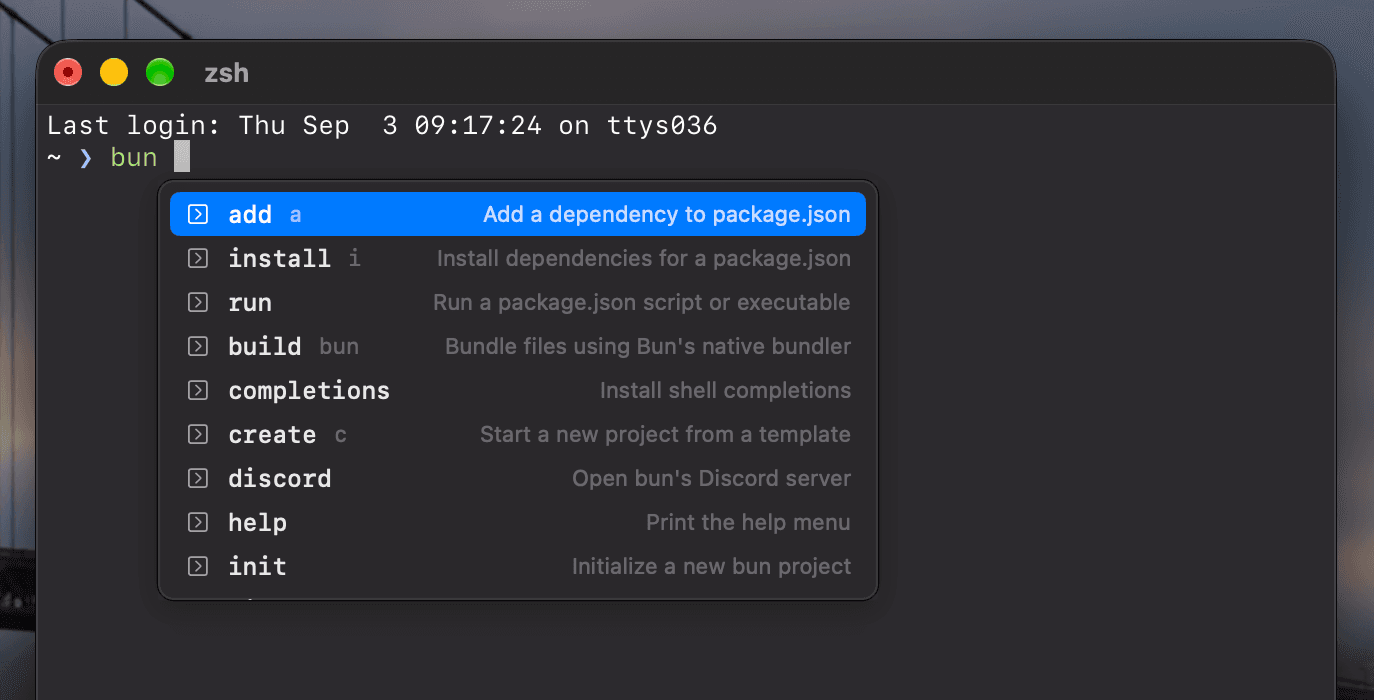
Sill in action

IDE-style completions for Terminal, iTerm2, VS Code, Ghostty, and cmux. A popup at your cursor shows subcommands, options, files, and branches for the command you're typing.

Features

  • Hundreds of CLIs from the open-source withfig/autocomplete corpus, refreshed daily
  • Arrows choose, Tab or Return inserts, Esc dismisses. Return still runs your command
  • Works with Secure Keyboard Entry on: keys are handled inside your shell, nothing watches the keyboard

What’s New

Version History
Version 1.9.1

Changed

  • The line Sill adds to ~/.zshrc stays the same wherever Sill is installed.

Fixed

  • Sill stopped working in every terminal when the copy of Sill that first turned on shell integration was moved or deleted, until shell integration was turned off and on again.
  • Folders created or deleted after you completed a path in the same folder were not reflected until the terminal tab was reopened.

Ratings & Reviews

5.0out of 5
★★★★★
★★★★
★★★
★★
★
3 Ratings

alias 지원 좋아요

Anonymous

원래 alias는 자동완성 안되어서 잘 안쓰고있었는데 어느날 갑자기 alias까지 읽어오더라구요 쓰기에 괜찮은것같습니다

대박이네요

Anonymous

완성도 대박입니다. 여기 앱들 다 그렇긴 한데 진짜 네이티브 앱같아요

👍👍👍

Anonymous

Fig 쓰려면 이제 aws 로그인해야되는데 바로 자동완성돼서 너무 좋네요 ssh도 되면 좋을거같아요

Developer Response

감사합니다!

More from Domus

Oriel app icon

Oriel

Window manager

Get
Transom app icon

Transom

Brightness controller

Get
Pharos app icon

Pharos

Sleep blocker

Get
Coffer app icon

Coffer

Clipboard manager

Get
Atrium app icon

Atrium

Window switcher

Get
Jamb app icon

Jamb

Text cursor jumper

Get
Keystone app icon

Keystone

Input source switcher

Get
Louver app icon

Louver

Per-app volume

Get
Shutter app icon

Shutter

Light/Dark toggle

Get
Lantern app icon

Lantern

Video to GIF

Get
Scupper app icon

Scupper

App remover

Get